
Aufgabe: Dummy eines Microservice zur Authentifizierung
Stellen Sie den Dummy des Mikroservice "SimpleAuthService" zur Authentifizierung von Benutzern fertig!
- simpleAuthService.py
- testSimpleAuthService.py
- index.html
Vorgehensweise
1. Laden Sie das Projekt von GitHub herunter: https://github.com/ateachment/SimpleAuthService/tree/develop-dummy-task
2. Installieren Sie die Bibliothek flask_cors, damit von Swagger aus, das unter einer anderen Domain läuft, JavaScript-Aufrufe auf dem lokalen Flask-Webserver erlaubt werden können. Ansonsten würde das die voreingestellte CORS Policy verhindern:
pip install flask_cors
Flask-Datei: simpleAuthService.py (unvollständig)
1 2 3 4 5 6 7 8 9 10 11 12 13 14 15 16 17 18 19 20 21 22 23 24 25 26 27 28 29 30 31 32 33 34 35 36 |
from flask import Flask, request import json # make cross-origin AJAX possible because of using swagger editor # https://flask-cors.readthedocs.io/en/latest/#using-json-with-cors from flask_cors import CORS, cross_origin app = Flask(__name__) CORS(app) # make cross-origin AJAX possible @app.route('/auth/user/login', methods=['POST']) def loginUser(): content_type = request.headers.get('Content-Type') if content_type == 'application/json': print(request) username = request.json['username'] password = request.json['password'] elif (content_type == 'application/x-www-form-urlencoded'): # regular html form data username = request.form['username'] password = request.form['password'] else: return 'Content-Type not supported: ' + content_type, 400 # Bad request if username == "testUser" and password == "testPwd": # Everything is OK return "{ \"token\": \"123456\" }" # JavaScript JSON parse don’t support single quote. else: return "{ \"token\": \"-1\" }", 403 # Forbidden Logout todo |
4. Testen Sie den Flask-Webserver automatisch folgendem Script:
Pytest zu installieren:pip install pytest
Der Aufruf des Testscripts erfolgt mit
pytest .\testSimpleAuthService.py
oder (falls das nicht funktioniert) mit
python -m pytest .\testSimpleAuthService.py
(Achten Sie dabei darauf, dass Sie sich auch im entsprechenden Verzeichnis befinden.)
Pytest-Datei: testSimpleAuthService.py (unvollständig)
1 2 3 4 5 6 7 8 9 10 11 12 13 14 15 16 17 18 19 20 21 22 23 24 25 26 27 28 29 30 31 32 33 34 35 36 37 |
import pytest import json from simpleAuthService import app def test_login_json_sucess(): data = { "username": "testUser", "password": "testPwd" } response = app.test_client().post('/auth/user/login', json=data) assert response.status_code == 200 token = json.loads(response.data.decode('utf-8')).get("token") assert token == '123456' def test_login_json_fail(): data = { "username": "testUser", "password": "testWrongPwd" } response = app.test_client().post('/auth/user/login', json=data) assert response.status_code == 403 token = json.loads(response.data.decode('utf-8')).get("token") assert token == '-1' def test_login_form_success(): data = "username=testUser&password=testPwd" headers = {'Content-Type': 'application/x-www-form-urlencoded'} response = app.test_client().post('/auth/user/login', data=data, headers=headers) assert response.status_code == 200 token = json.loads(response.data.decode('utf-8')).get("token") assert token == '123456' def test_logout(): todo |
5. Stellen Sie das Script SimpleAuthService.py mit Hilfe von
pytest .\testSimpleAuthService.py
6. Laden Sie die YAML-Datei in den Swagger Editor und Testen Sie die Funktionalität manuell:
Yaml-Datei: openapi.yaml
1 2 3 4 5 6 7 8 9 10 11 12 13 14 15 16 17 18 19 20 21 22 23 24 25 26 27 28 29 30 31 32 33 34 35 36 37 38 39 40 41 42 43 44 45 46 47 48 49 50 51 52 53 54 55 56 57 58 59 60 61 62 63 64 65 66 67 68 69 70 71 72 73 74 75 76 77 78 79 80 81 82 83 84 85 86 87 88 89 90 91 92 93 94 95 96 97 98 99 100 101 102 103 104 105 106 107 108 109 110 111 112 113 114 115 116 117 118 119 |
openapi: 3.0.3 info: title: Simple Auth Service description: |- Simple Authentification Service - [The Simple Authentification Service repository](https://github.com/ateachment/to-do) license: name: Apache 2.0 url: http://www.apache.org/licenses/LICENSE-2.0.html version: 0.0.1 externalDocs: description: https://mo6273.schulportal.hessen.de url: https://mo6273.schulportal.hessen.de servers: [ { url: 'http://localhost:5000/auth/', description: 'Local server' }, { url: 'https://petstore3.swagger.io/api/v3', description: 'Testing server' } ] tags: - name: user description: Operations about user paths: /user/login: post: tags: - user summary: Logs user into the system description: '' operationId: loginUser requestBody: description: Logs user into the system content: application/json: schema: $ref: '#/components/schemas/User' application/x-www-form-urlencoded: schema: $ref: '#/components/schemas/User' required: true responses: '200': description: Login sucessful content: application/json: schema: $ref: '#/components/schemas/ValidToken' application/x-www-form-urlencoded: schema: $ref: '#/components/schemas/ValidToken' '403': description: Invalid username/password supplied content: application/json: schema: $ref: '#/components/schemas/InvalidToken' /user/{token}: delete: tags: - user summary: Logs out current logged in user description: '' operationId: logoutUser parameters: - name: token in: path description: Token that has to be deleted required: true schema: type: string format: UUID_SHORT responses: '200': description: Logout sucessful content: application/json: schema: $ref: '#/components/schemas/InvalidToken' components: schemas: User: type: object properties: username: type: string example: testUser password: type: string example: testPwd ValidToken: type: object properties: token: type: string example: 123456 InvalidToken: type: object properties: token: type: string example: -1 requestBodies: UserArray: description: List of user object content: application/json: schema: type: array items: $ref: '#/components/schemas/User' |
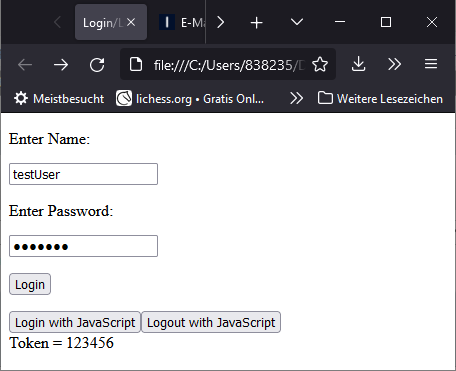
7. Ergänzen Sie und testen Sie das HTML-Frontend:
HTML-Datei: index.html (unvollständig)
Tatsächlich ist diese Datei nicht notwendig. Sie dient nur zur Demonstration des Aufrufs der API.
1 2 3 4 5 6 7 8 9 10 11 12 13 14 15 16 17 18 19 20 21 22 23 24 25 26 27 28 29 30 31 32 33 34 35 36 37 38 39 40 41 42 43 44 45 46 47 48 49 50 51 52 53 54 55 56 57 58 59 60 61 62 63 64 65 66 67 68 69 70 71 72 73 74 75 76 77 78 79 80 81 82 83 84 85 86 87 88 |
<!DOCTYPE html> <html lang="en"> <head> <meta charset="UTF-8" /> <title>Login/Logout Form</title> <script> var token = "-1"; function login () { // post form data // var formData = new FormData(document.getElementById("myForm")); // lazy but short // data = JSON.stringify(Object.fromEntries(formData.entries())) var formData = new FormData(); formData.append("username", document.getElementById("username").value); formData.append("password", document.getElementById("password").value); data = JSON.stringify(Object.fromEntries(formData.entries())) // fetch post fetch("http://localhost:5000/auth/user/login", { method: "POST", headers: { 'Content-Type': 'application/json' }, body: data }) // return server response as text .then((result) => { if (result.status != 200 && result.status != 403) //if not logged and if not wrong username/pwd throw Error(result.statusText); else return result.text(); }) // output response .then((response) => { console.log(response); const obj = JSON.parse(response); // JavaScript JSON parse don’t support single quote. document.getElementById("response").innerHTML = "Token = " + obj.token token = obj.token }) // error handling .catch((error) => { console.log(error); alert("Oops! Something went wrong!") }); } function logout () { todo |
HTML-Seite zum Testen