
Tasks: Improvements of class PyAD
Completion requirements
Improve method
Improve method
Improve method
Improve method
Opened: Monday, 7 October 2019, 12:00 AM
Due: Monday, 14 October 2019, 12:00 AM
You are aware that until now
- Deleting of a student will fail if it has already been deleted.
- The creation of a school class will fail if it has already been created.
- Only existing and empty school classes can be deleted.
- The creation of students with the same username is not possible. In addition, the following attributes of the Student are not yet initialized in the AD: password, surname ("sn"), firstname ("givenName") and date of birth.
The corresponding methods of the class PyAD have to be improved. Choose with your group one of the following work orders:
(UML 1.x activity diagrams help to illustrate the problems.)
Improve method PyAD.deleteStudent()
A student should only be deleted if it really exists. (Level of difficulty: easy)
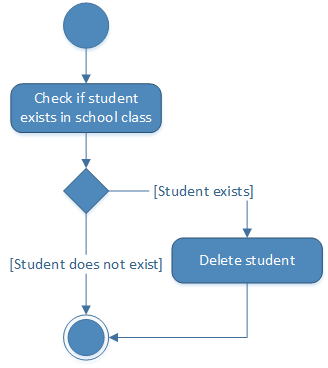
UML 1.x activity diagram: Deleting a student
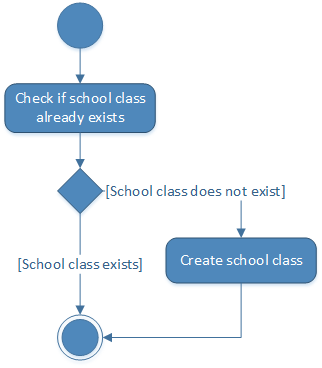
Improve method PyAD.createSchoolClass()
A school class should only be created if it did not already exist before.
(Level of difficulty: easy)
UML 1.x activity diagram: Creating a school class
Improve method PyAD.deleteSchoolClass()
A school class should only be deleted if it exists. If necessary, all students must first be deleted by the method.
(Level of difficulty: moderate)
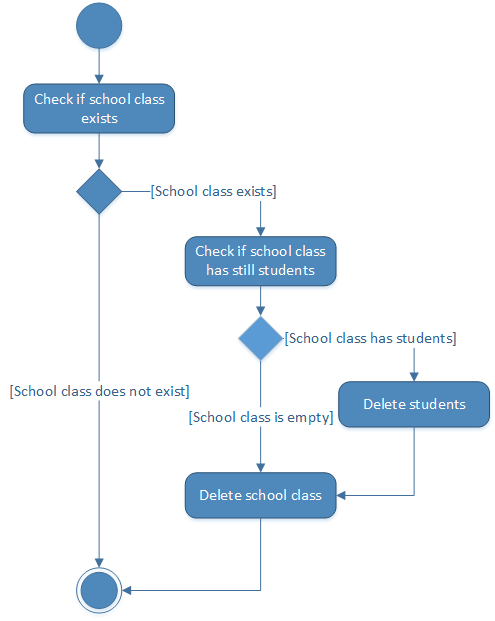
UML 1.x activity diagram: Deleting a school class
Improve method PyAD.createStudent()
In AD, a student's user name (common name - cn) must be unique. Therefore, if necessary, add letters of the first name to the user name until the user name no longer has a duplication.
In addition, the following attributes of the student must also be initialized in the AD: Password, last name ("sn"), first name ("givenName") and date of birth.
(Level of difficulty: tough)
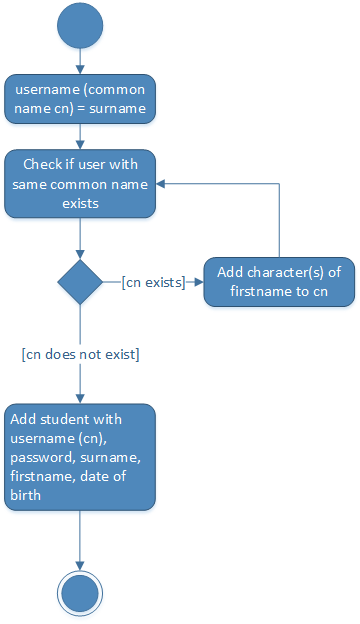
UML 1.x activity diagram: Creating a student