
Program loops
Python loops
In Python you have two types of loops to choose from (both are head controlled):
whileloopforloop
Here are two examples:
The while loop
# Demo: while loop

key = ''
while key != 'q':                           # as long as 'q' was NOT entered
    key = input("Press 'q' to cancel!")
    print("You have entered " + key + ".")
The while loop first checks whether the condition is met, and then executes or repeats the loop body if necessary.
The for loop
# Demo: for loop

characterList = ['P','y','t','h','o','n']
for character in characterList:         # iterate through list
    print(character)
The for loop is used to iterate through lists in order to process the individual elements.
If there is no more element in the list, the condition is no longer fulfilled and the execution is terminated.
Both types of loops are top-controlled loops, which means that the loop body, if the condition is not fulfilled, is not passed through at all:
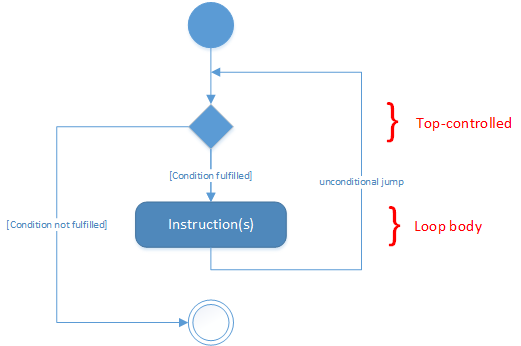
UML 1.x activity diagram of a top-controlled loop
No predefined bottom-controlled loop in Python
In fact, there is no predefined do while loop in Python, as in other languages such as C/C++, Java or .NET:
do
{
    /* statement(s); */
    /*increment loop counter*/
} while ( condition );
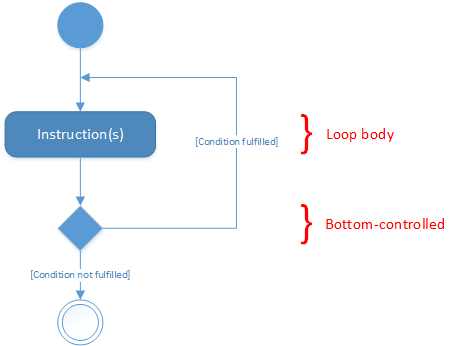
UML 1.x activity diagram of a bottom-controlled loop
Therefore it must be defined by yourself, what can happen e.g. by using of the keyword break:
The break statement
The Python break statement immediately terminates a loop entirely. Program execution proceeds to the first statement following the loop body.
Example:
n = 5
while n > 0:
    n -= 1
    if n == 2:
        break
    print(n)
print('Loop ended.')
Output:
4
3
Loop ended.
The continue statement
The Python continue statement immediately terminates the current loop iteration. Execution jumps to the top of the loop, and the controlling expression is re-evaluated to determine whether the loop will execute again or terminate.
Example:
n = 5
while n > 0:
    n -= 1
    if n == 2:
        continue
    print(n)
print('Loop ended.')
Output:
4
3
1
0
Loop ended.
The else clause
The <additional_statement(s)> specified in the else clause will be executed when the while loop terminates:
while <expr>:
    <statement(s)>
else:
    <additional_statement(s)>
In fact, if you know other program languages, you may wonder why you might need an else for loops, because you could accomplish the same thing by putting those statements immediately after the while loop, without the else:
while <expr>:
    <statement(s)>
<additional_statement(s)>
In the first case, they are only executed if the condition at the beginning of the loop is no longer fulfilled. If the loop ends with a break, they are not executed.
Example 1:
n = 5
while n > 0:
    n -= 1
    print(n)
    if n == 2:
        break
else:
    print('Loop done.')
Output 1:
4
3
2
Example 2:
n = 5
while n > 0:
    n -= 1
    print(n)
else:
    print('Loop done.')
Output 2:
4
3
2
1
0
Loop done.