
Excursus: Java FX
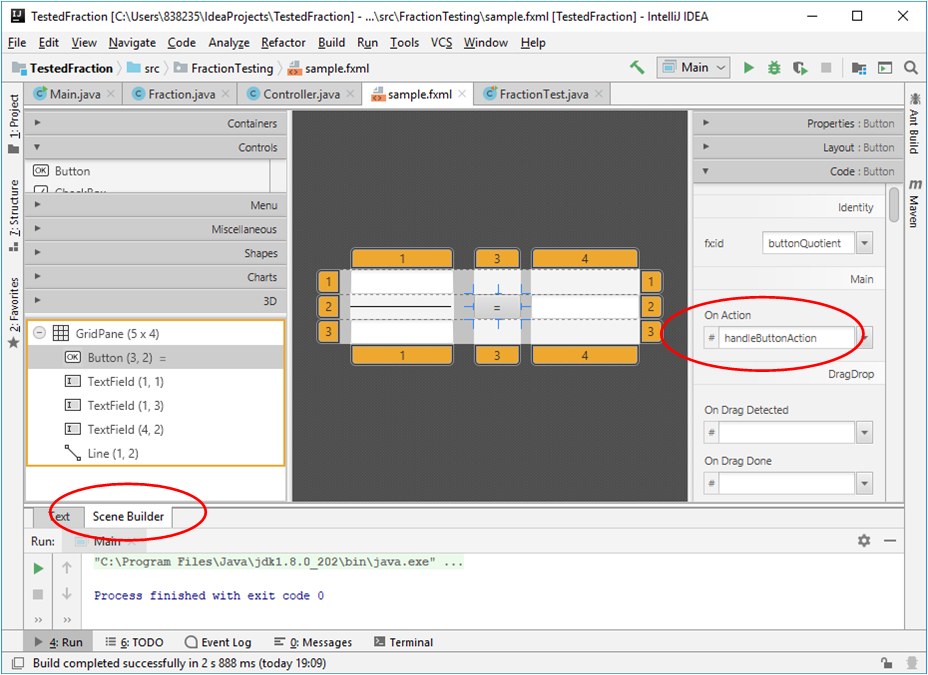
Using the Java FX Scene Builder the elements of the application window can placed with ease:
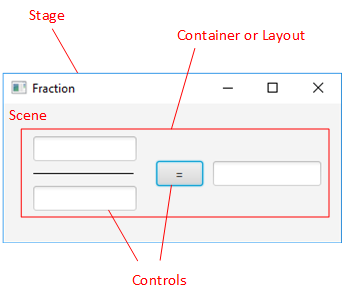
Window respectively Stage of Fraction
Note that the buttonQuotient is associated with the #handleButtonAction action:
<?xml version="1.0" encoding="UTF-8"?>

<?import javafx.scene.control.Button?>
<?import javafx.scene.control.TextField?>
<?import javafx.scene.layout.ColumnConstraints?>
<?import javafx.scene.layout.GridPane?>
<?import javafx.scene.layout.RowConstraints?>
<?import javafx.scene.shape.Line?>

<GridPane alignment="center" hgap="10" xmlns="http://javafx.com/javafx/8.0.172-ea" xmlns:fx="http://javafx.com/fxml/1" fx:controller="FractionTesting.Controller">
   <children>
      <Button fx:id="buttonQuotient" ellipsisString="=" mnemonicParsing="false" onAction="#handleButtonAction" prefHeight="25.0" prefWidth="47.0" text="=" GridPane.columnIndex="3" GridPane.rowIndex="2" />
      <TextField fx:id="inputTextFieldNum" prefHeight="25.0" prefWidth="100.0" GridPane.columnIndex="1" GridPane.rowIndex="1" />
      <TextField fx:id="inputTextFieldDenom" prefHeight="25.0" prefWidth="181.0" GridPane.columnIndex="1" GridPane.rowIndex="3" />
      <TextField fx:id="outputTextField" prefHeight="25.0" prefWidth="108.0" GridPane.columnIndex="4" GridPane.rowIndex="2" />
      <Line endX="50.0" startX="-50.0" GridPane.columnIndex="1" GridPane.rowIndex="2" />
   </children>
   <columnConstraints>
      <ColumnConstraints maxWidth="81.0" minWidth="0.0" prefWidth="0.0" />
      <ColumnConstraints maxWidth="201.0" minWidth="65.0" prefWidth="104.0" />
      <ColumnConstraints maxWidth="39.0" minWidth="0.0" prefWidth="0.0" />
      <ColumnConstraints maxWidth="47.0" minWidth="47.0" prefWidth="47.0" />
      <ColumnConstraints maxWidth="206.0" minWidth="107.0" prefWidth="109.0" />
   </columnConstraints>
   <rowConstraints>
      <RowConstraints maxHeight="9.0" minHeight="0.0" prefHeight="0.0" />
      <RowConstraints maxHeight="25.0" minHeight="16.0" prefHeight="25.0" />
      <RowConstraints />
      <RowConstraints />
   </rowConstraints>
</GridPane>
XML code generated by Java FX Scene Builder in fxml file
MVC Pattern
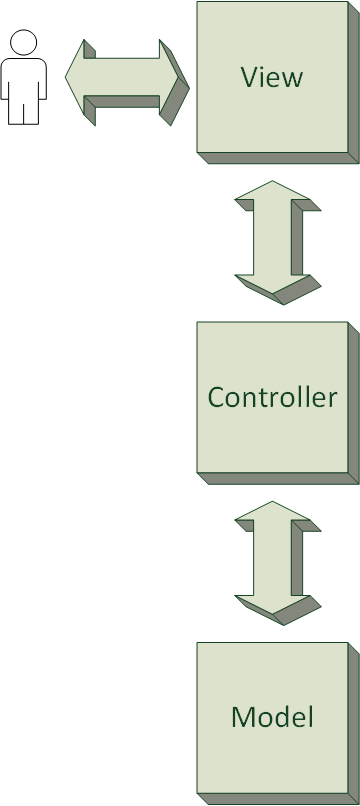
JavaFX brings the MVC pattern to bear (model view controller). The MVC pattern occurs in many variations, which are not described here.
But in general the user interacts with the View. The Controller presents the View (In this context it is also called "Presenter") and establishes a connection to the Model (data). The aim is to clearly separate the design from code.
View
The view is represented by fxml files (see above). FXML is an XML-based markup language that is used to specify the object tree of user interfaces created with JavaFX. The controller class, its attributs and event handlers are referenced by defined attributes (underlined).
MVC-Pattern (simplified)
Controller
The controller is represented by a java class. It needs to conform to some rules:
package FractionTesting;

import javafx.event.ActionEvent;
import javafx.fxml.*;
import javafx.scene.control.Button;
import javafx.scene.control.TextField;

public class Controller {
    @FXML                                                                   // Attributes referenced in fxml file
    private Button buttonQuotient;
    @FXML
    private TextField outputTextField;
    @FXML
    private TextField inputTextFieldDenom;
    @FXML
    private TextField inputTextFieldNum;

    @FXML
    private void handleButtonAction(ActionEvent event) {                    // Event handler referenced in fxml file

        Double numerator = Double.parseDouble(inputTextFieldNum.getText());
        Double denominator = Double.parseDouble(inputTextFieldDenom.getText());

        Fraction fraction = new Fraction(numerator, denominator);           // Separation of GUI and logic layer
        outputTextField.setText(Double.toString(fraction.quotient()));
    }
}
Controller.java
The controller class can have accessible attributes which are referenced by x:id attributes in fxml files. It can have methods as well, which can be specified as event handlers in fxml by event attributes. The annotations are indispensable here. The controller file itself is referenced by controller:fx attribute.
(The controller can have an accessible initialize()
method, which should take no arguments and have a return type of void.
The FXML loader will call the initialize() method after the loading of
the FXML document is complete.)
The controller is instantiated by the FXML loader.
package FractionTesting;

import javafx.application.Application;
import javafx.fxml.FXMLLoader;
import javafx.scene.Parent;
import javafx.scene.Scene;
import javafx.stage.Stage;

public class Main extends Application {

    @Override
    public void start(Stage primaryStage) throws Exception{
        Parent root = FXMLLoader.load(getClass().getResource("sample.fxml"));   // load fxml file
        primaryStage.setScene(new Scene(root, 340, 140));                       // window size 340 x 140 px
        primaryStage.setTitle("Fraction");                                      // set window title
        primaryStage.show();
    }

    public static void main(String[] args) {
        launch(args);
    }
}
Loading the controller
The
FXML loader will automatically look for accessible instance variables
of the controller. If the name of an accessible instance variable
matches the fx:id attribute of an element, the object reference from
FXML is automatically copied into the controller instance variable. This
feature makes the references of UI elements in FXML available to the
controller.
Modell
The Modell is presented by classes which handle the data respectively persistance.
package FractionTesting;

public class Fraction {
    private double numerator, denominator;

    Fraction(double numerator, double denominator) {
        this.numerator = numerator;
        this.denominator = denominator;
    }

    public double quotient() {
        if (denominator == 0)
            throw new java.lang.ArithmeticException("/ by zero");
        return numerator/denominator;
    }
}
Fractionclass represents the Model in this example.