
Windows Clients
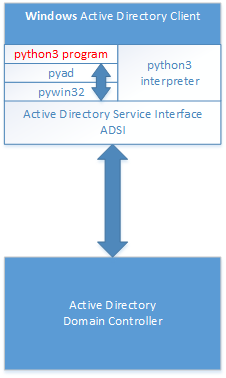 The easiest way to manage the Active Directory with Python is as follows:
A Windows client is a domain member in the Active Directory. Using the Python library pyad, which in turn uses the Python library pywin32, the domain controller is accessed via ADSI interface.
For this purpose, a domain administrator must be logged on to the Windows client.
Install Python
- Download the latest version for Windows
https://www.python.org/downloads/ - Execute MSI file
During Installation be aware of adding Python to environment variables:
Then it is not necessary to navigate to the appropriate installation directory to start Python.
It can be started from anywhere in the console.
Required libraries
pyad
pyad is a Python library designed to provide an interface to Active Directory through Active Directory Services Interface ADSI on the Windows platform.
This library is needed for manipulating objects (users, ous, computers) .
Documentation is here: https://zakird.github.io/pyad/
pypiwin32
pypiwin32 is a library which is used by pyad. It is a Python wrapper to Windows specific functionality and APIs (Application Programming Interface). There is no need to program in C, .NET, powershell etc.
Installing commands in Windows Console are:
pip install pyad
pip install pypiwin32