
Excursion: Windows Access Control
Windows maintains an access token for each user logged on to the system; the access token contains information identifying the user and the user groups to which the user belongs and information about other privileges that might be available. A copy of this access token is later associated with each process launched by that user. The operating system selectively grants or denies access to system services by comparing the access token of the running process with the security information attached to the system object that the user wants to access.
Each user and user group is identified in the access token by a unique value called a security identifier (SID). Every system object - such as a thread, a mutex, a semaphore, an event, a file or folder - can contain a security descriptor that includes the SID of the object's owner and of the primary user group to which the owner belongs. Also stored in this security descriptor is the
discretionary access control list (DACL), which controls access permissions, and the system access control list (SACL), which specifies operations on the object that should generate audit messages. Both types of access control lists (ACLs) are really linked lists of access control entries (ACEs). Each ACE in a DACL either grants or denies a certain permission to a specific user or user group. The system checks each ACE in the DACL to determine whether permission has been
granted or denied. Once it makes the determination, it does not examine the remaining ACEs:
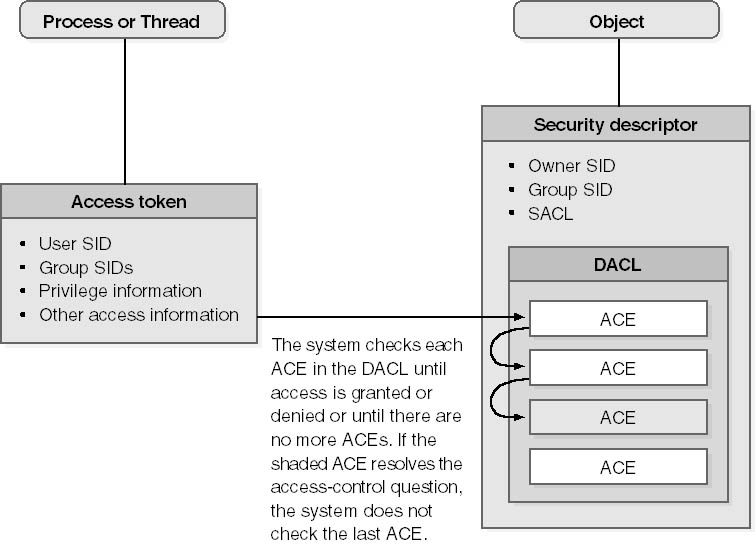
Checking an object's DACL to determine whether the client has the requisite permissions.
(https://thrysoee.dk/InsideCOM+/ch18b.htm - 16.10.2019)
Example
The following figure shows an example ACL for an object. The object's ACL contains three ACEs. The field principal SID specifies the SID to which the ACE applies. These ACE apply to the SIDs Alice, Bob, and Group1. The other two important fields in an ACE
are its type (grant
or deny) and the access rights (a bitmask). The Alice and Bob ACEs grant rights, and the Group1 ACE denies access to certain rights. The access rights bitmask is interpreted based on the object type field in the ACE:
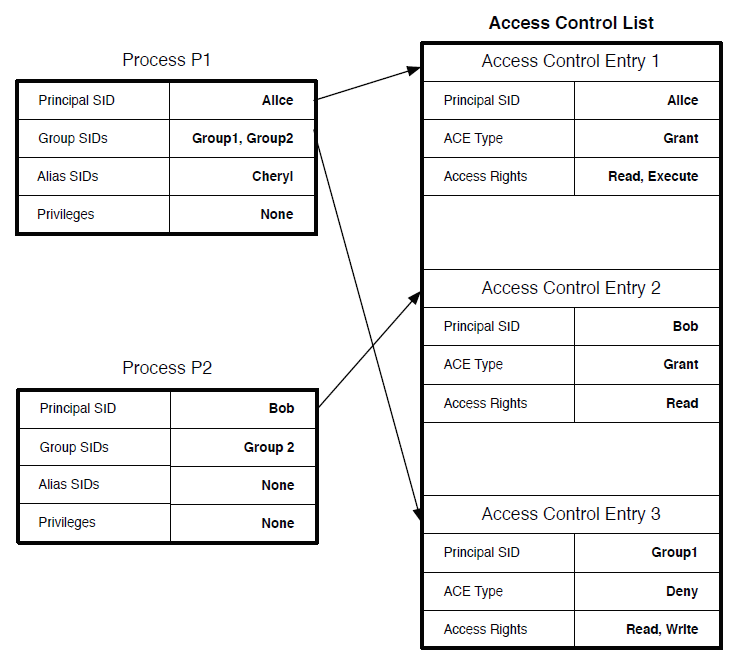
Windows Access Control Lists (ACLs) and process tokens
Because of the negative permissions, the way that the SRM processes authorization queries is more complicated than in the UNIX case. The main difference is that the ACEs in an ACL are ordered, and the ACEs are examined in that order. The ACEs are searched through until a set of ACEs that permits the operation or a single ACE that denies the operation is found. If an ACE grants the
necessary operations, then the request is authorized. However, if a deny ACE is encountered that includes one of the requested operations, then the entire request is denied.
The ACEs of the object’s ACL are ordered as shown above.
Note that the
ACE field for access rights is really a bitmap, but we list the operations to simplify understanding. Further, we specify the process tokens for two processes, P1 and P2. Below, we show the authorization results for a set of queries by these processes
for the target object.
P1, read: ok
P1, read, write: no
P2: read: ok
P2: read, write: no
Both P1 and P2 can read the target object, but neither can write the object. P1 cannot write the object because the P1 token include Group1 which matches the deny ACE for writing. P2 cannot write the object because the ACE for Bob does not permit writing.
(https://pdfs.semanticscholar.org/330c/29dbb32696c3f6a85ffb188e373e821461e9.pdf - 16.10.2019)