Possible Solution: Home directory
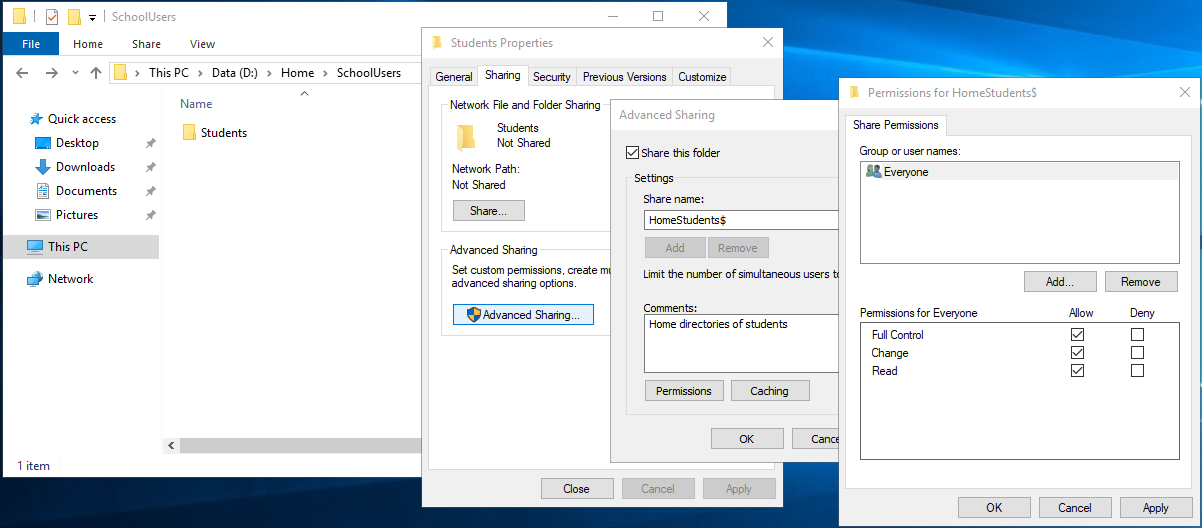
The home directories of the students are to be created on the file server FSX1 under D:\Home\SchoolUsers\Students.
To ensure maximum flexibility, a share HomeStudents$ has to be created for \\FSX1\D:\Home\SchoolUsers\Students.
Creation of share HomeStudents$
The $ at the end of the share name hides the share from people browsing.
The share permissions for the folder are changed to “Full Control”. On the one hand this ensures maximum flexibility, on the other hand the authorizations are restricted by NTFS permissions.
An AD user must be assigned the path to his home directory as an additional attribute:
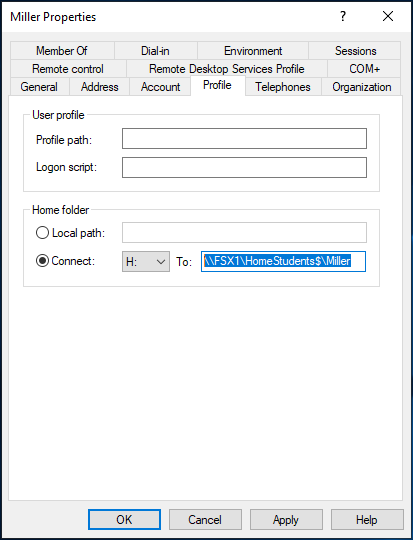
If this is done manually and this setting is applied, the home directory of the user is created immediately!
When user login, it will be connected as drive H:
He or she can create files and save it permanently in there:
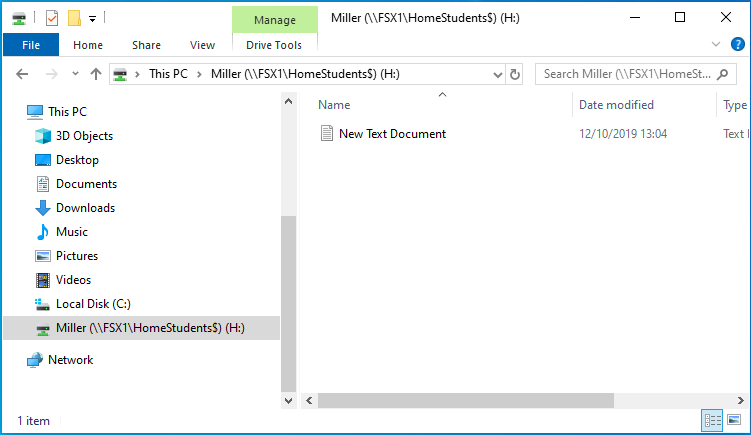
Home directory of logged in Student
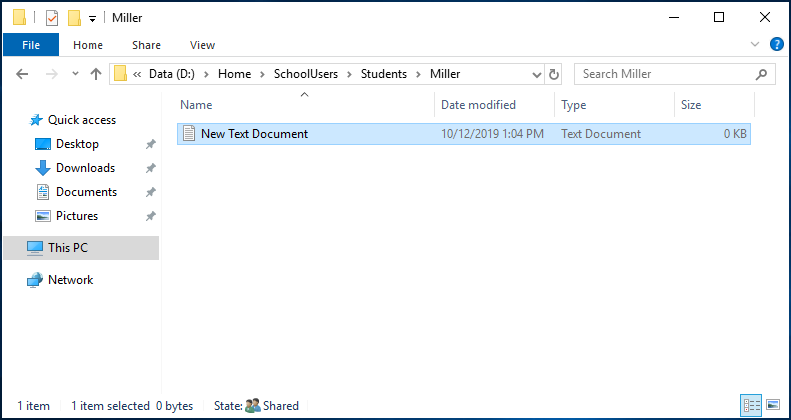
Home directory of Student on file server
A glance at the permissions of the home directory created by the system in comparison with a directory created manually on the file server shows that the home directory lists in addition the relevant user of the home directory with full access:
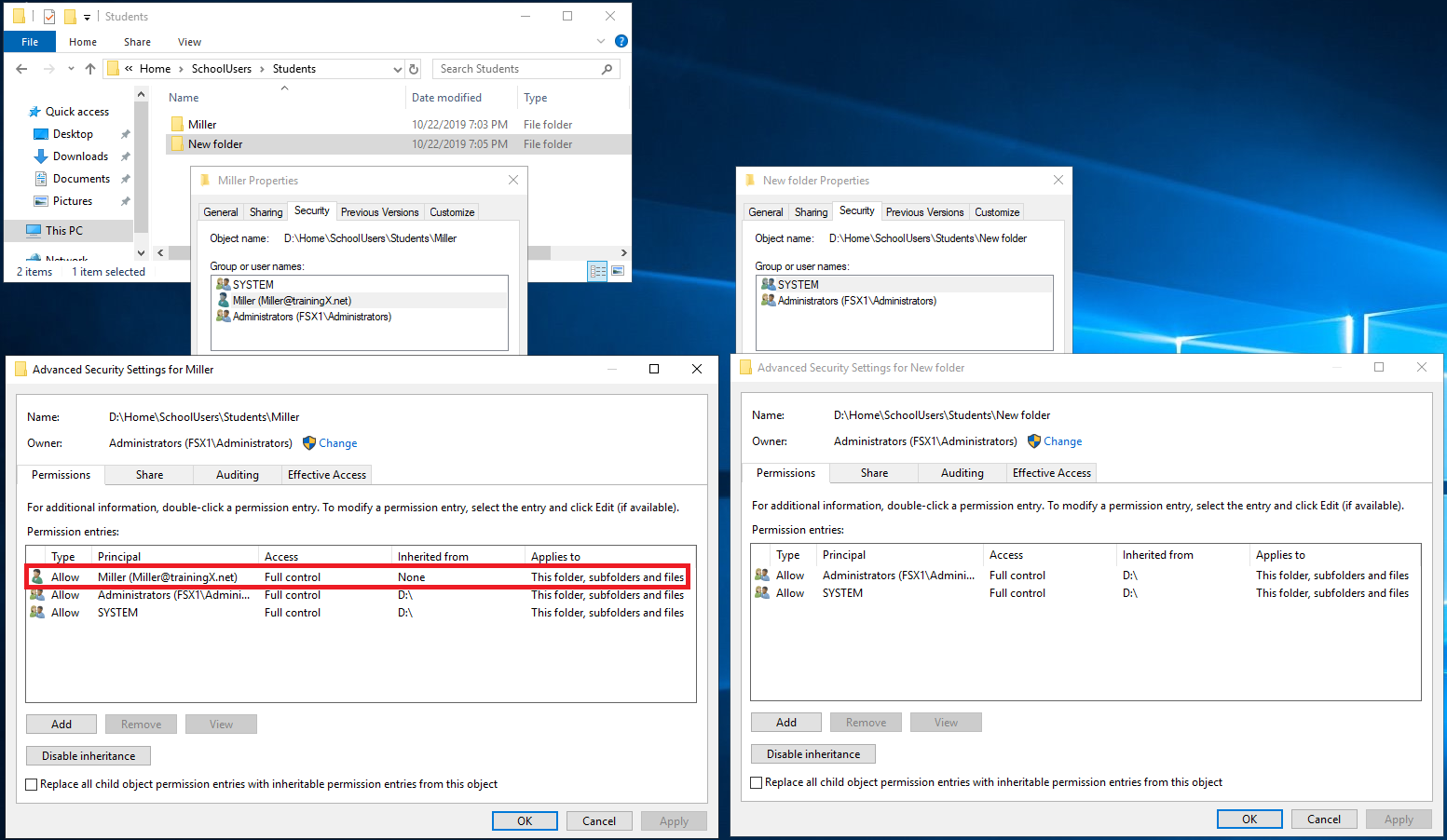
Analyzing of home folder's Security Settings
username@domain has full control on the home folder, subfolders and files.
Conclusion:
The following additional functionalities have to be implemented:
- An AD user must receive the path to his home directory as an additional attribute.
- In addition, the programmatic creation of the home directory is necessary, since it is no longer created automatically.
- The user to be created must have full access rights to his home directory.
Settings.py
The three static properties domainName, shareHomeStudents$ and homeDrive were added to class Settings:
1 2 3 4 5 6 7 |
class Settings: domainName = "trainingX.net" dnSchool = "dc=trainingX, dc=net" # Distinguished of domaine dnStudents = "ou=Students, ou=SchoolUsers, " + dnSchool # Distinguished Name of OU Students shareHomeStudents = "\\\\FSX1\\HomeStudents$" # "\" must be escaped by another "\" homeDrive = "H:" |
Fileserver.py
A new class Fileserver manages the functionality on the file server (factory pattern):
1 2 3 4 5 6 7 8 9 10 11 12 13 14 15 16 17 18 19 20 21 22 23 24 25 26 27 28 29 30 31 |
from Settings import Settings import os import shutil import win32security class Fileserver(): def createHomeDirStudent(self, username): homeDir = Settings.shareHomeStudents + "\\" + username if os.path.exists(homeDir) == False: # if home dir does not exist os.mkdir(homeDir) # make dir # How to set DACLs: # https://stackoverflow.com/questions/26465546/how-to-authorize-deny-write-access-to-a-directory-on-windows-using-python user, domain, type = win32security.LookupAccountName ("", Settings.domainName + "\\" + username) # Find the SIDs for user of home dir sd = win32security.GetFileSecurity(homeDir, win32security.DACL_SECURITY_INFORMATION) # Find the DACL part of the Security Descriptor for the folder dacl = sd.GetSecurityDescriptorDacl() # get security descriptor DACL dacl.AddAccessAllowedAceEx(win32security.ACL_REVISION, 3, 2032127, user) # add full control to folder, subfolder and files ACE to DACL sd.SetSecurityDescriptorDacl(1, dacl, 0) # Put new (extended) DACL into the Security Descriptor, win32security.SetFileSecurity(homeDir, win32security.DACL_SECURITY_INFORMATION, sd) # update the folder with the updated Security Descriptor def deleteHomeDirStudent(self, username): homeDir = Settings.shareHomeStudents + "\\" + username if os.path.exists(homeDir) == True: # if home dir exists # os.rmdir(homeDir) # remove dir (must be empty!) # os.system('rmdir /S /Q "{}"'.format(homeDir)) shutil.rmtree(homeDir, ignore_errors=True) # remove dir with content recursively |
The page Excursion: Windows Access Control describes the function of Security Descriptors, DACL, ACL and ACE in detail.
The above listed code in the method createHomeDirStudent()
- creates the home directory,
- determines the SID of the respective user of the home directory,
- determines the security descriptor of the home directory,
- extracts the DACL with the ACL of the home directory from the Security Discriptor,
- adds a new ACE with full permissions of the home directory user to the ACL,
- assigns the Security Descriptor the new, extended DACL with the ACL and
- assigns the changed Security Discriptor to the home directory.
Method deleteHomeDirStudent() creates the home directory. It must also be possible to delete non-empty directories. The library shutil was selected for this purpose.
Ldap.py
In method createStudent() of class PyAD the setting of home drive and home directory was added as optional attributes:
1 2 3 4 5 6 7 8 9 10 11 12 13 14 15 16 17 18 19 20 21 22 23 24 25 26 27 28 29 30 31 32 33 34 35 36 37 38 39 40 41 42 43 44 45 46 47 48 49 50 51 52 53 54 55 56 57 58 59 60 61 62 63 64 65 66 67 68 69 70 71 72 73 74 75 76 77 78 79 80 81 82 83 84 85 86 87 88 89 90 91 92 93 94 95 96 97 98 99 |
from abc import ABC, abstractmethod # import Abstract Base Classes (ABCs) class AbstractLDAP(ABC): def __init__(self, dnStudents): self._dnStudents = dnStudents super().__init__() @abstractmethod def createStudent(self, username, nameSchoolClass): pass @abstractmethod def deleteStudent(self, username, nameSchoolClass): pass @abstractmethod def createSchoolClass(self, nameSchoolClass): pass @abstractmethod def deleteSchoolClass(self, nameSchoolClass): pass from pyad import * from Settings import Settings from Fileserver import * class PyAD(AbstractLDAP): def createStudent(self, username, surname, firstname, password, dateOfBirth, nameSchoolClass): query = adquery.ADQuery() cnUnique = False numChar = 0 while(cnUnique == False): query.execute_query(attributes = ["cn"], # query: does cn already exist where_clause=("cn = '" + username + "'"), base_dn = Settings.dnSchool) if query.get_row_count() > 0: # yes: add character numChar = numChar + 1 if(numChar <= len(firstname)): # if the character set of the first name is large enough username = surname + firstname[:numChar] # add number of characters from beginning of first ame else: # if the character set of the first name is used up username = surname + firstname + (numChar - len(firstname)) * 'x' # added number of 'x' else: # cn is unique => create user cnUnique = True ouSchoolClass = pyad.adcontainer.ADContainer("ou="+nameSchoolClass+", "+self._dnStudents, adsi_ldap_com_object=None, options={}) aduser.ADUser.create(username , ouSchoolClass , password=password , upn_suffix=None , enable=True , optional_attributes={"sn":surname , "givenName":firstname , "employeeID":dateOfBirth # using existing employeeId attribute is easier than extending AD scheme , "description":"Student" , "pwdLastSet":0 # password must be changed on first login , "homeDrive":Settings.homeDrive # set home drive , "homeDirectory":Settings.shareHomeStudents + "\\" + username}) # set home directory return username # return possibly modified username def deleteStudent(self, surname, firstname, dateOfBirth, nameSchoolClass): # print("delete ", surname, firstname, dateOfBirth, nameSchoolClass) dnSchoolClass = "ou="+nameSchoolClass + ", " + self._dnStudents query = adquery.ADQuery() query.execute_query(attributes = ["cn"], where_clause=("sn = '" + surname + "' and givenName = '" + firstname + "' and employeeID = '" + dateOfBirth + "'"), base_dn = dnSchoolClass) if query.get_row_count() >= 1: # if student exists => delete it ouSchoolClass = pyad.adcontainer.ADContainer(dnSchoolClass, adsi_ldap_com_object=None, options={}) fs = Fileserver() for row in query.get_results(): ouSchoolClass.from_cn(row["cn"]).delete() fs.deleteHomeDirStudent(row["cn"]) def createSchoolClass(self, nameSchoolClass): query = adquery.ADQuery() query.execute_query(attributes = ["distinguishedName"], where_clause=("ou = '" +nameSchoolClass + "'"), base_dn = self._dnStudents) if query.get_row_count() == 0: # if school class not yet exists => create ouStudents = pyad.adcontainer.ADContainer(self._dnStudents, adsi_ldap_com_object=None, options={}) ouStudents.create_container(nameSchoolClass) def deleteSchoolClass(self, nameSchoolClass): dnSchoolClass = "ou="+nameSchoolClass+", "+ self._dnStudents query = adquery.ADQuery() query.execute_query(attributes = ["distinguishedName"], where_clause=("ou = '" +nameSchoolClass + "'"), base_dn = self._dnStudents) if query.get_row_count() == 1: # if school class exists query = adquery.ADQuery() query.execute_query(attributes = ["sn", "givenName", "employeeID"], # employeeID holds date of birth, where_clause=("cn = '*'"), base_dn = dnSchoolClass) if query.get_row_count() > 0: # if school class not empty for row in query.get_results(): # delete students self.deleteStudent(row["sn"], row["givenName"], row["employeeID"], nameSchoolClass) ouSchoolClass = pyad.adcontainer.ADContainer(dnSchoolClass, adsi_ldap_com_object=None, options={}) ouSchoolClass.delete() # delete school class |
Also, do not forget to delete the home directory in the deleteStudent() method.
School.py and User.py are unchanged and were already described in Solutions: Implementation and integration of student import.
testHomeDir.py
The above defined functionality is used with the following code:
1 2 3 4 5 6 7 8 9 10 | from School import * # import classes from User import * from Fileserver import * schoolClass = SchoolClass("school_class1",[]) student = Student("Miller", "Sam", "11.11.2000", schoolClass) schoolClass.addToLDAP() #schoolClass.deleteFromLDAP() |
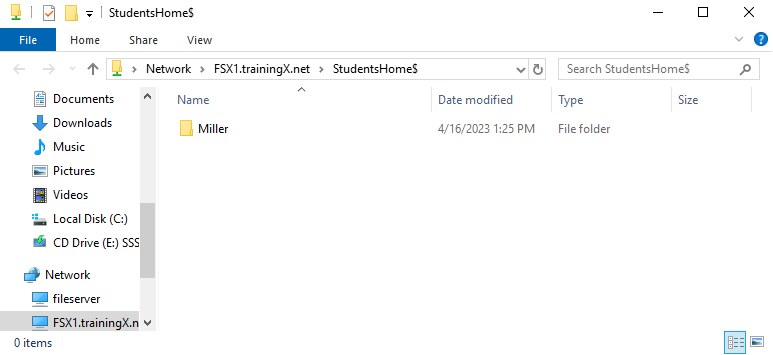
The administrator can access Miller's home directory via the StudentHome$ share: